


CAN Bus Troubleshooting –
typical causes and fast diagnosis
In practice, faults in CAN bus systems often follow a very similar pattern. The network does not start, stops when a new node is connected, shows sporadic dropouts, or error frames occur. In most cases, the root cause is not the protocol itself, but the physical structure of the network. Experience shows that many faults can be narrowed down and resolved quickly with just a few basic checks. Typical fault symptoms include:
- The CAN bus network does not work at all.
- Communication stops when a new node is hot-plugged.
- The network initially runs, but then fails sporadically.
- A CAN analysis tool reports error frames or bus-off states.
The most common causes include:
- missing or incorrect termination
- mismatched bit rates between nodes
- unsuitable CAN cable
- improper topology or excessively long stub lines
Missing or incorrect termination
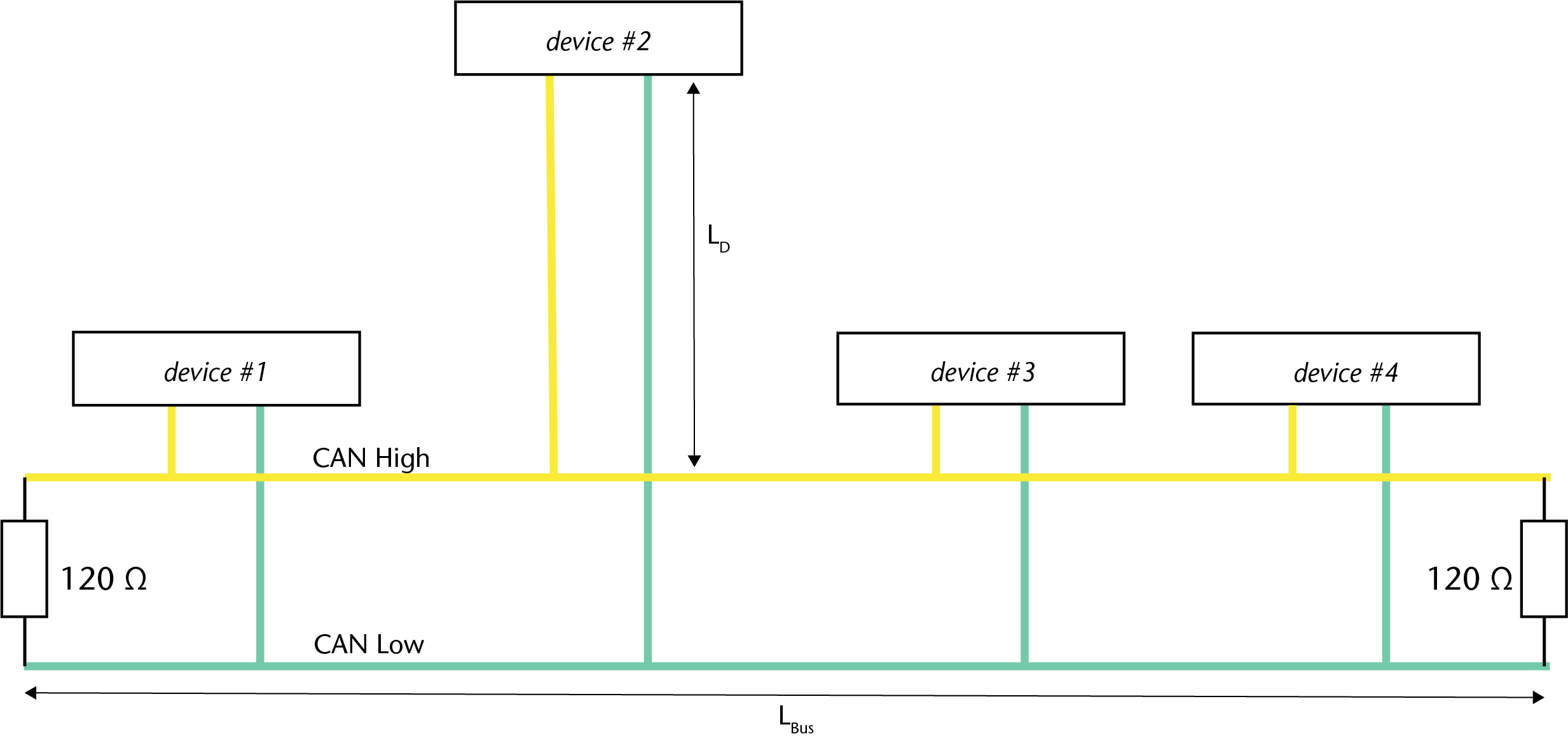
Correct termination ensures that signal reflections at the ends of the cable are suppressed. In a high-speed CAN network, the bus must be terminated at both physical ends with 120 ohms between CAN-High and CAN-Low. Only then will the expected overall resistance of approximately 60 ohms be measured when the network is de-energised.
For troubleshooting, this measurement is often the quickest point of entry:
- approx. 60 ohms: termination is generally correct
- significantly below 60 ohms: too many terminations
- approx. 120 ohms: only one termination present
- kOhm range: no effective termination present
What matters is not only the resistance value, but also the position of the terminating resistors. They must be placed at the physical ends of the bus segment. Even if the resistors are electrically present, communication can still become unstable if they are mounted in the wrong places in the network.
Mismatched bit rates between nodes
Another common fault is an inconsistent bit-rate configuration. Even a single node with the wrong bit rate can severely disrupt communication across the entire network. Typical consequences are error frames, communication dropouts, or the loss of individual nodes.
Particularly tricky are devices that initially start up with a default bit rate and only switch to the intended configuration after a few seconds. During this phase, a large number of error telegrams may occur. Some nodes may then fail to reach the intended operating state and switch to bus-off.
In practice, it is therefore advisable to check systematically during commissioning:
- Which bit rate is configured on each node?
- Do all devices start immediately with the correct bit rate?
- Are there any nodes whose CAN interface is only initialised after a delay?
Unsuitable CAN cable
Not every twisted two-wire cable is automatically suitable for CAN. For robust communication, the electrical properties of the cable must match the system requirements. Of particular importance is the characteristic impedance of the cable system. Only if the cable and termination are matched properly will the bus operate with low reflections and remain stable in the long term.
An unsuitable cable may appear to work in small or slow systems at first. Problems often arise only when:
- the cable length is increased,
- additional nodes are added,
- the bit rate is increased, or
- the electromagnetic environment becomes more demanding.
For this reason, CAN applications should consistently use a cable designed specifically for CAN.
Often overlooked: excessively long stub lines and improper topologies
One point that is often missed during troubleshooting is excessively long stub lines, as well as star-shaped or otherwise unfavourable topologies. High-speed CAN is fundamentally designed as a linear bus structure: the main line is terminated at both ends, and the nodes are connected via branches that should be as short as possible.
In practice, this means:
- keep the main line as straight as possible
- keep stub lines as short as possible
- critically review any branches added later
- only use star topologies if they have been explicitly designed and verified for the specific application
Recommended troubleshooting sequence
Anyone wishing to check a CAN bus system in a structured way will usually reach the root cause quickly by following a simple sequence:
- Switch off the supply and measure the resistance: are approximately 60 ohms present between CAN-High and CAN-Low?
- Check the topology: are the terminations really located at the physical ends? Are there unnecessarily long stub lines?
- Compare the bit rate of all nodes: do the configuration and start-up behaviour match?
- Check the cable: is a suitable CAN cable actually installed?
- Observe with the analysis tool: when do error frames or bus-off states occur, and which node is involved?